 ThingzSafe
A shelf full of things.
A few photos.
A head start.
Take up to ten photos and ThingzSafe suggests the items it can see, ready for you to check, tidy up and save.
See how it worksStep-by-step guideA bookshelf you have been meaning to catalogue. A workshop full of tools. Equipment in the barn. Getting started is often the hardest part. Bulk photo recognition turns what is in front of you into a list you can edit, instead of a stack of blank forms.
How it works
Photograph. Check. Save.
Photograph your items
Take up to ten photos in one go, or pick photos from your phone. Start wide, then move closer for titles and labels.
Check one combined list
ThingzSafe brings the suggestions from all your photos together. Fix names, check quantities and compare with what you already have.
Choose a category and save
Put the batch into Books, Tools or any category you like. Save only the ones you want.
On your phone
See the suggestions before saving
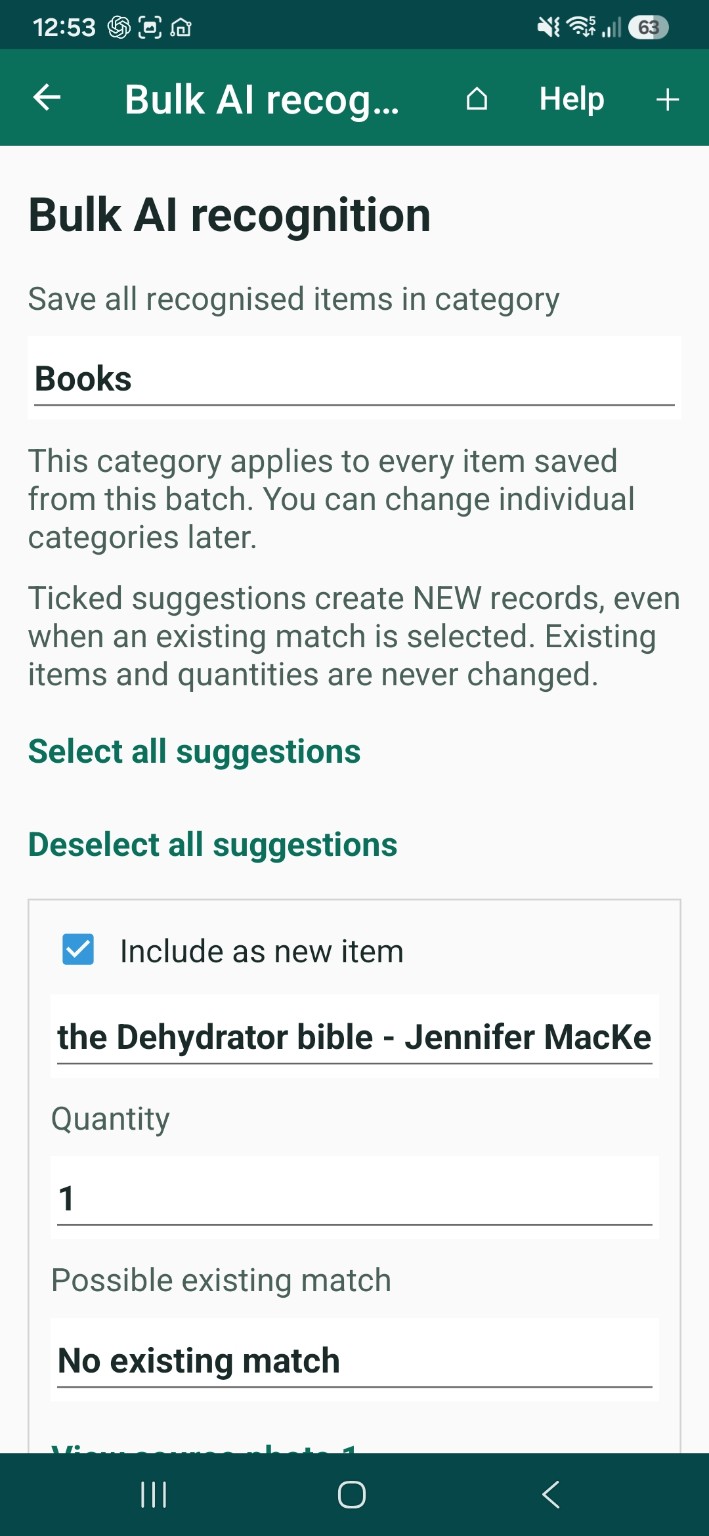
Choose the type of thing before adding photos, then choose a save category after recognition. Keep only the suggestions you want. Nothing is added until you save.
You decide. Every suggestion can be edited, and nothing goes into your inventory until you confirm.
What could you catalogue?
If you can photograph it, you have a head start.
Books and collections
Make a start on books, CDs, records or board games. Clear close-ups help ThingzSafe read visible titles, and you fill in anything it cannot read.
Tools and workshops
Turn a view of a workbench or tool shelf into suggestions you can check, instead of typing each one.
Farms and smallholdings
Record the equipment you can see in a barn, store or shed, kept by the places you already use.
Rooms and storage
Build a starting list of furniture, appliances and other visible items in a room, cupboard or storage space.
Clubs, classrooms and small businesses
Get a shared store or equipment cupboard onto the list quickly, then add the details later.
It knows where you are
Built around the way you organise things.
Start from a Site, an Area, or a Thing’s Parts or Contents. ThingzSafe uses that place to understand the photos, and puts the new entries where you expect them.
- Photographing a bookcase? Save what is recognised as its Contents.
- Working through a garage? Start in that Area.
- Choose one category for the whole batch, and change individual ones afterwards.
Already have some of it?
Spot possible repeats before you save.
ThingzSafe spots possible matches with items you already have recorded, even when the wording is different. For example, “Wooden double bed” and “Double bed”. You decide if they are the same.
Possible matches start unticked, so you do not add the same thing twice. Own another one? Tick it to create a separate record. Your existing item is never changed.
Tidy results
One object in several photos, or several objects?
If two suggestions show the same object, untick the extra one. Check quantities before saving.
Stock checks
Give your stock check a photographic head start.
From the Android stock check screen, photograph what you are counting. ThingzSafe suggests counts for what it can see. Check the matches and the numbers, return to your normal stock check, make your final corrections and save.
Anything not visible in the photos keeps its current quantity. It is never written off or set to zero.
Nothing to set up
No separate AI account needed.
Photo recognition is part of ThingzSafe Pro. You do not need your own OpenAI account, ChatGPT subscription or key. You need an internet connection, and usage limits apply. If recognition is not available, you can keep adding items by hand.
Your photos
Temporary photos. Lasting records you choose.
Your selected photos, and relevant descriptions from your inventory, are sent to OpenAI to recognise items and suggest matches. The working photos are temporary. Choose an item photo or crop to keep if you want one in your inventory. The help guide explains what happens to your photos in full.
Included · Android
Included with Pro on Android.
Free and Household users can see the option and find out how to upgrade. There is no bulk photo recognition screen in the web app in this release.
| Feature | Free | Household | Pro |
|---|---|---|---|
| Bulk photo recognition | Upgrade to Pro | Upgrade to Pro | Included · Android |
A helpful start, with you in charge. Recognition can miss items or get details wrong. Titles and labels need to be readable, quantities need checking, and it cannot see what is hidden inside things. It does not give valuations.
Ready to see it on your own shelf?
Photo recognition is part of ThingzSafe Pro on Android.
Compare plans