 ThingzSafe
Ask your inventory
anything.
Which of my cameras have a receipt? What are my tools worth? Where is the spare ladder? Ask ChatGPT in plain English, or connect your own tools with the developer API.
See what you can askDeveloper APIChatGPT is a separate service from OpenAI. You connect it to your household yourself, and ThingzSafe is not affiliated with or endorsed by OpenAI.
How it works
Connect once. Then just ask.
Connect it once
Any household member can link ChatGPT to the household with their own ThingzSafe sign-in, and choose what it may do. You never give ChatGPT a ThingzSafe password.
Ask in everyday words
“What is inside the fridge freezer?” “What are my workshop tools worth?” ChatGPT looks through your inventory to answer.
Review before anything changes
If you ask for a change, you see the exact before and after first. Nothing happens until you approve it.
Try asking
Questions you would never have time to answer by hand.
Where is it?
Answers come from your own Sites, Areas, Things, Parts and Contents.
What is it worth?
Totals use your entered values and available estimates, and different currencies stay separate.
What is missing?
Spot the gaps before you need the figures.
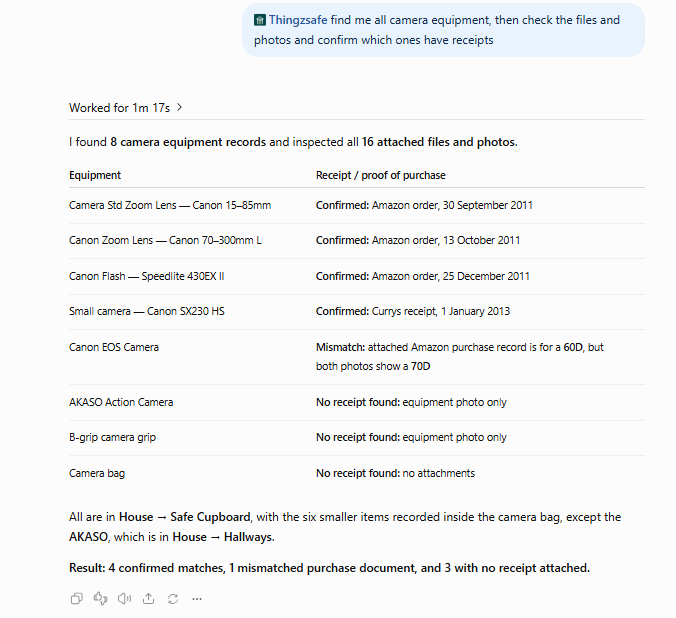
Which have a receipt?
ChatGPT looks through saved photos and documents. This needs the separate photos and documents permission.
Find it fast
If two places match, ChatGPT asks which you mean.
Tidy up, with your say-so
You see exactly what would change. Then you approve it, or ask for a different preview.
Receipts and documents
Know which receipts you have before you need them.
Before an insurance claim, a warranty query or a clear-out, ChatGPT can look through the photos and documents saved with your Things, including scanned PDF receipts, and tell you what it found.
- Which Things have a matching receipt.
- Which purchase documents seem to belong to a different item.
- Which Things have no receipt on file.
- Anything it could not read. These are reported as unchecked, never as “no receipt”.
Made for real life
The family home. The club store. The small business.
At home
Get a quick answer on what you own, where it is and what it is worth, ready for a conversation with your insurer.
Clubs, schools and associations
Ask what is in the store cupboard, where the kit is kept, and which equipment still has its paperwork.
Small businesses
Check equipment and stock records without opening report after report.
Developer API
Connect your inventory to your own tools.
The developer API gives your applications and scripts structured requests and results. Look up Sites, Areas and Categories, search Things and their Parts or Contents, calculate valuation totals and retrieve supported attachments.
The web app’s How to use API screen lets you try searches, valuation reports and supported changes first, inspect the requests and responses and copy a working example.
Explore the API documentation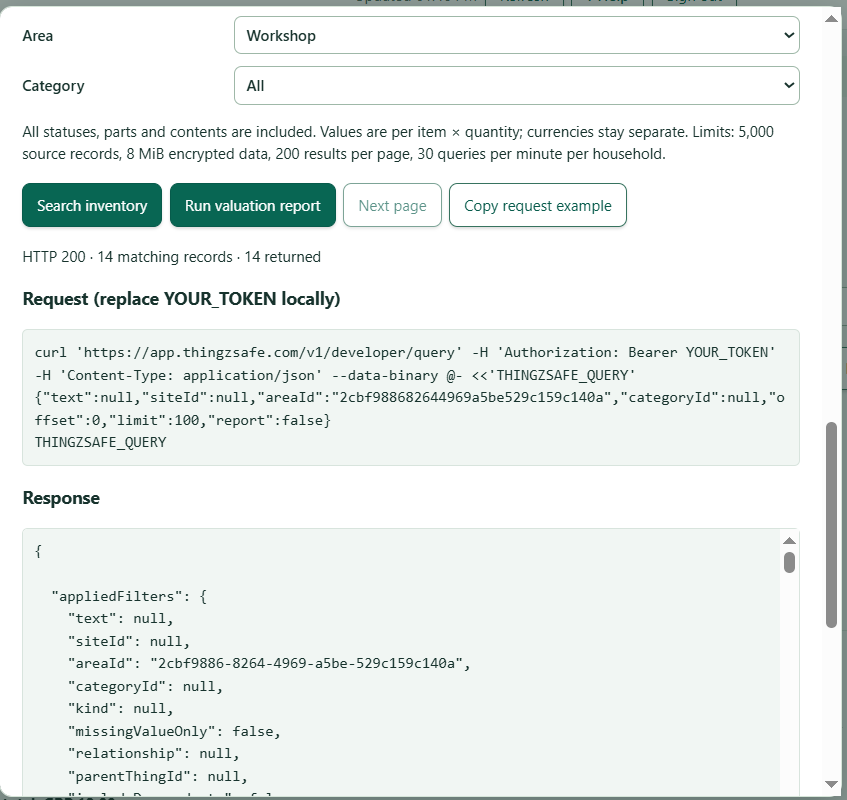
You stay in charge
Changes are previewed. Access is yours to control.
- Create a Thing, update supported details or move Things. Every change begins as a preview of the exact records and details.
- Previews expire after 15 minutes and do not lock your records. If something relevant changes first, the preview is rejected so you can review a fresh one.
- Retrying a batch that has already finished returns its result. It never applies the same changes twice.
- Reading inventory, valuation reports, inventory changes and photo and document access are separate permissions. ChatGPT can also draft a bug or feature request for us, with its own permission and your approval of the text.
- Each person who connects ChatGPT chooses its permissions, and the household owner creates developer API tokens. Access can be revoked whenever you need to, in How to use API.
Good to know
What it can and cannot do today
It can
- Search and value your inventory
- Look up Sites, Areas and Categories
- Read supported photos and documents
- Create, edit and move Things after you approve a preview
It cannot yet
- Create or edit Sites, Areas or Categories
- Delete anything
- Answer structured questions about loans, rentals or contacts
- Upload attachments
ChatGPT can make mistakes when it reads your inventory or a document, so check its conclusions and any proposed changes. When you allow photo and document access, the content of the files you select is sent to ChatGPT for that conversation. Allow it only for a household and files you want analysed there.
Good questions
Before you connect
Do I need Pro?
No. Both the ChatGPT connection and the developer API are included with Household and Pro. Household members connect ChatGPT with their own ThingzSafe sign-in and choose the permissions. The household owner creates developer API tokens.
What do I need for ChatGPT?
A ThingzSafe Household or Pro plan with your inventory synced to the cloud, and a ChatGPT account. It currently works with a free ChatGPT account, but ChatGPT is a separate service. OpenAI decides which plans can use plugins and custom connections, may change this, and sets the usage limits. You do not enter an OpenAI API key into ThingzSafe.
Is this the same as ThingzSafe’s built-in AI tools?
No. The ChatGPT connection lets you work with your cloud inventory in your own ChatGPT conversation. ThingzSafe’s built-in AI photo recognition and replacement valuations remain Pro features.
Can ChatGPT or an application change my inventory?
Only when you grant the necessary permission, and supported changes are always shown as a preview first. You can revoke access from How to use API in the web app.
Does connecting share every photo?
No. Photo and document access is a separate permission. With it, ChatGPT can retrieve the attachments of the Things selected for a task and analyses them in the conversation.
Household: share it, search it, ask it.
ChatGPT and developer API access are included with Household and Pro, alongside cloud sync, sharing and the web app.
Set up ChatGPT or the API Compare plansChatGPT and OpenAI are trademarks of OpenAI. ThingzSafe is independent and is not affiliated with or endorsed by OpenAI.